Limited offer50% off your first month: the $99 plan for $4924 hours onlySee plans

OXYGENvsClay

Oxygen vs Clay Clay builds and emails the list. Oxygen adds LinkedIn and a deals pipeline.

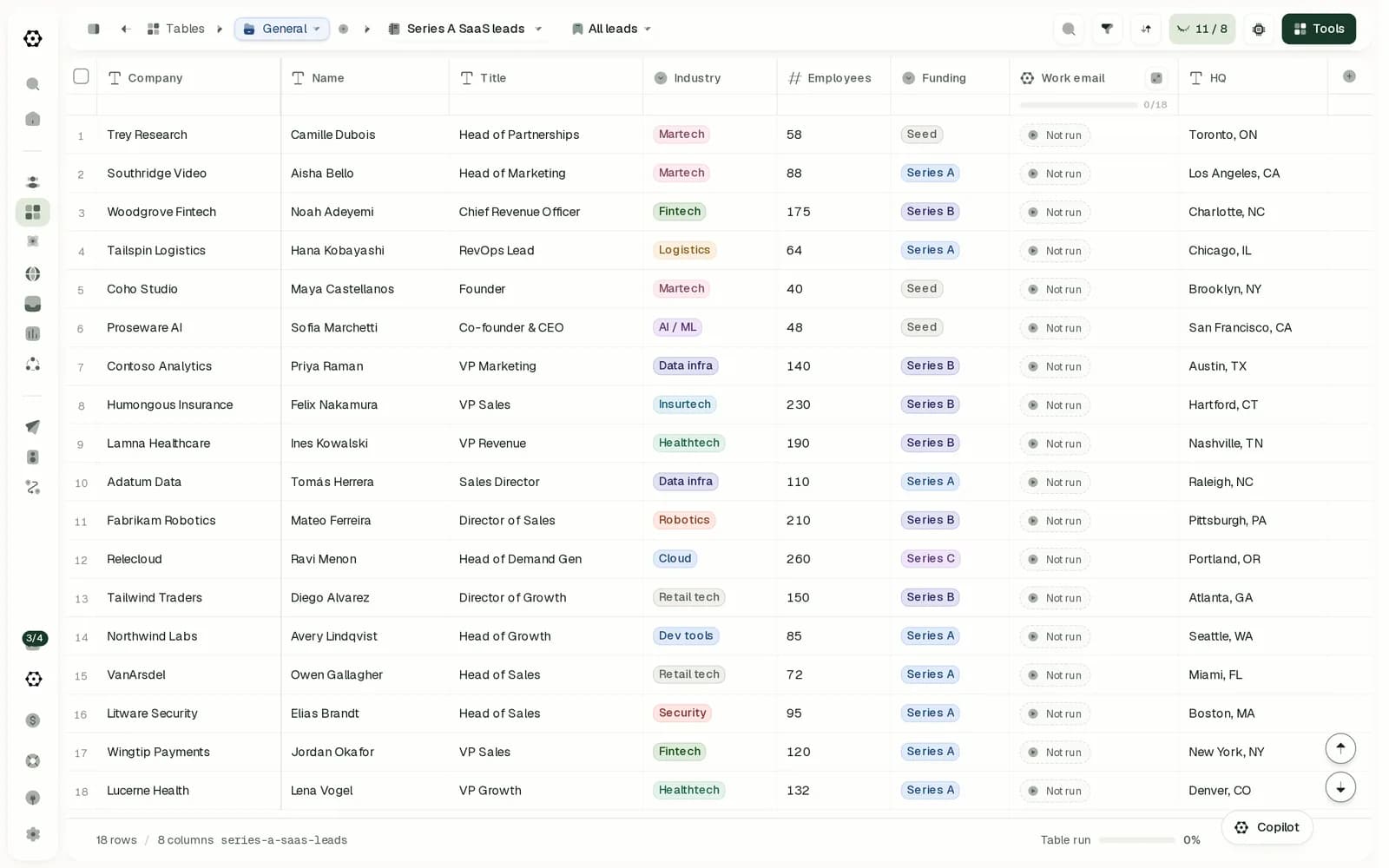
Oxygen keeps tables of up to 1,000,000 rows next to email and LinkedIn sequences, workflows and a CRM with deals, from $49 a month. Clay leads on lead data, with 150+ data providers on its credits and a 900M-person database, on CRM syncs from its Growth plan, and on SOC 2 and ISO 27001.

Used by B2B GTM teams at

  • Sympower
  • SignalFisher
  • Flino
  • FIOR
  • Grasp
  • Growth Alliance
  • Atticus

Oxygen vs Clay: the short answer

Choose OXYGEN if

  • You want LinkedIn invites and messages in the same sequence as your emails; Clay hands LinkedIn to a separate tool with its own price.
  • Your lists outgrow 50,000 rows: an Oxygen table holds up to 1,000,000 rows on the $49 plan.
  • You want deals in a pipeline, objects you define and replies on each record's timeline; Clay's Audiences has no deals pipeline.
  • You want sending, LinkedIn and a CRM from $49 a month; sending on Clay starts with Launch at $185.

Choose Clay if

  • You want the most data providers on one credit balance: Clay's credits buy data from 150+ providers.
  • You want to search 900M people and 70M companies inside the tool you enrich in.
  • Salesforce runs your pipeline and records must sync both ways.
  • Your security review asks for SOC 2 Type II, ISO 27001 or SSO.
Best fit by team
TeamPickWhy
A sales team of 3 on email and LinkedInOXYGEN$118.50 a month against $185 plus a LinkedIn tool, with LinkedIn in the same sequence as email.
RevOps enriching lists across many providersClay150+ data providers on its credits, a 900M-person database and HTTP API columns.
A team that wants lists, outreach and a CRM in one placeOXYGENTables, sequences, one inbox and a CRM with deals in one workspace.
A team on SalesforceClaySalesforce syncs both ways from Clay's Growth plan; Oxygen has no Salesforce sync.

Why switch from Clay to Oxygen

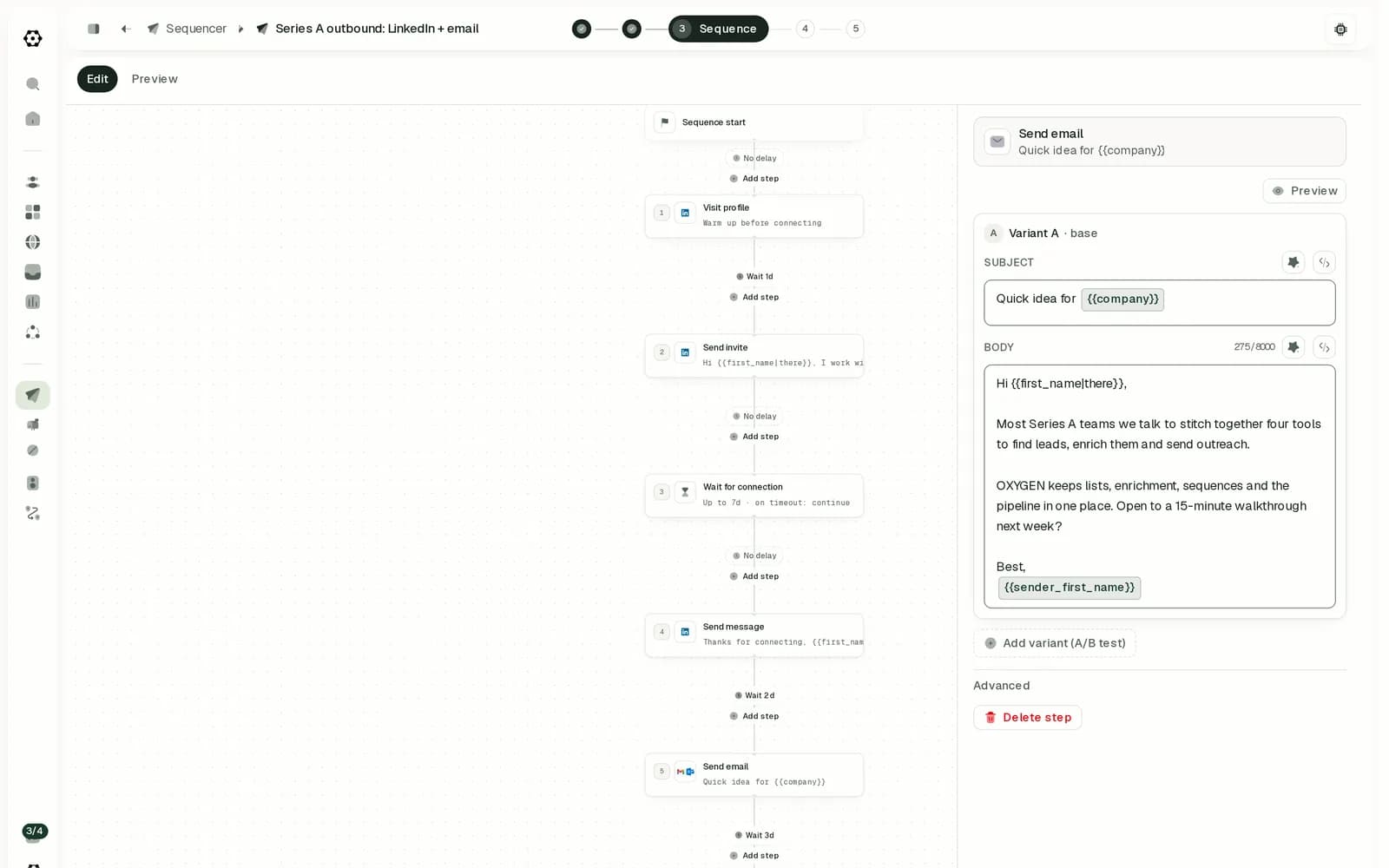
An Oxygen sequence that visits a LinkedIn profile, sends an invite, waits for the connection, sends a message and then an email

LinkedIn needs a separate tool

Clay sends no LinkedIn steps: a table pushes leads into a LinkedIn tool such as HeyReach, with its own account and price. Oxygen runs LinkedIn and email in one sequence, at $34 a month per LinkedIn account.

LinkedIn automation in detail
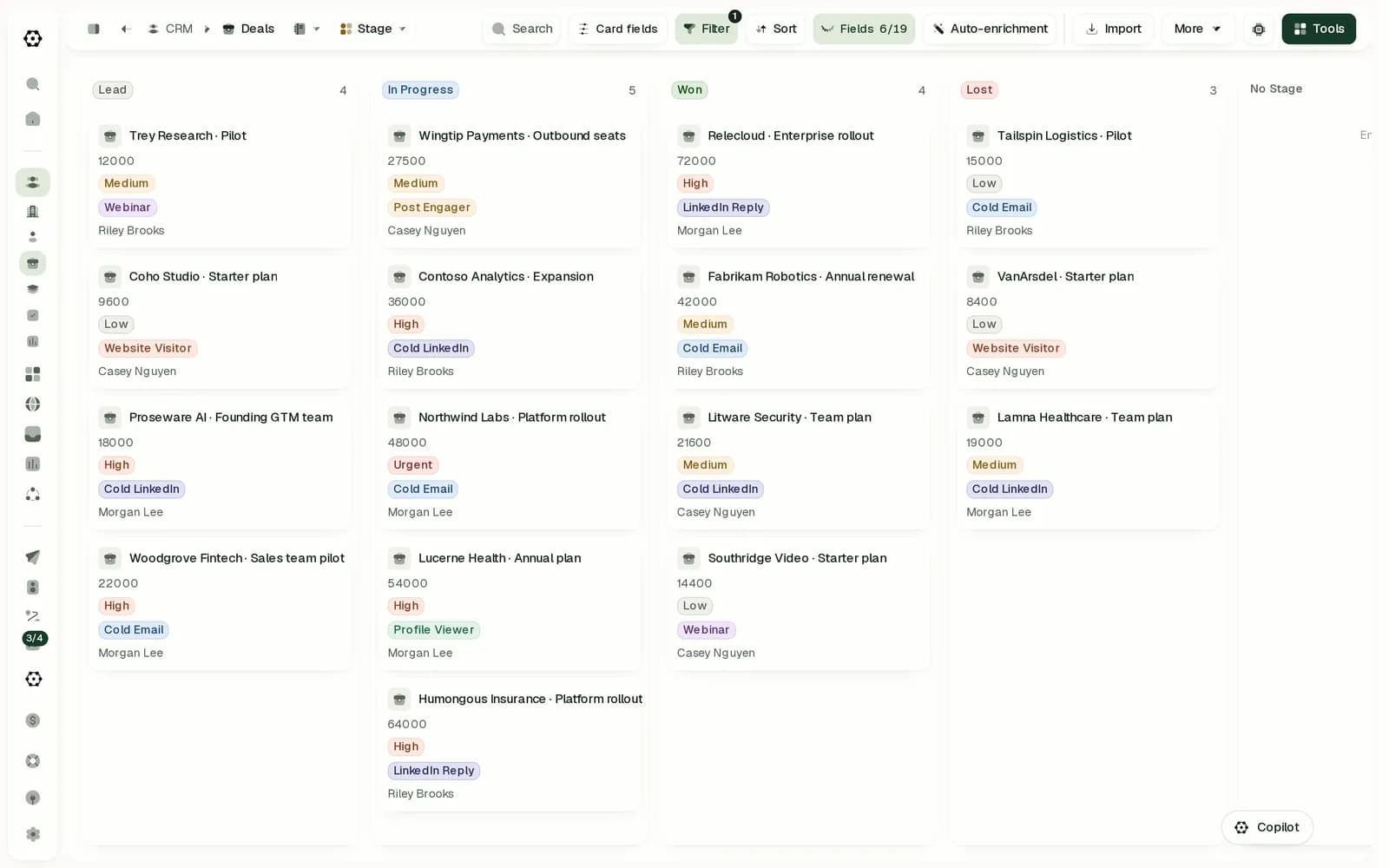
The Oxygen deals board with deals in Lead, In Progress, Won and Lost

No deals pipeline after the reply

Clay's Audiences enriches people, companies and imported deals, with no deals pipeline or custom objects of its own. Oxygen's CRM tracks deals on a pipeline and logs replies on each record's timeline, on every plan.

Built-in CRM in detail

Sending starts at $185 a month

Clay's Sequencer needs Launch at $185 a month, and buying mailboxes in Clay needs Growth at $495. Oxygen sends email and LinkedIn from $49 a month, with inboxes at $4 each.

Pricing model in detail

Oxygen vs Clay at a glance

Oxygen and Clay compared on 14 criteria
CriterionOXYGENClay
Lead data and signals
Lead data from multiple vendorsHow many providers the email waterfall tries on the vendor's credits, and how lookups are billed.Email and phone waterfalls across 17 and 13 providers, on plan credits or own keys from the $99 plan. Managed finders charge on a hit; email checks bill even on a miss.Waterfalls on Clay's data credits from 150+ providers on every plan, Free included, or on your own keys. Its directory lists more than 20 work-email finders; an email costs about 1 credit, a phone number about 5 from Launch. Ahead
Tables for lead listsSpreadsheet tables for building lists: relations, formulas, enrichment columns and rows per table.Tables you edit like a spreadsheet, with relations between tables, formula columns, and enrichment and AI columns that fill every row. Up to 1,000,000 rows per table on the $49 plan and 3,000,000 from the $199 plan. AheadTables with typed columns, lookups between tables, JavaScript formulas, and AI and enrichment columns that run on new rows. Up to 50,000 rows per table on Launch and Growth, 200 on Free.
SignalsWhich buying signals it captures, what they cost, and whether one can start outreach.LinkedIn profile viewers, new followers and post reactions from your connected accounts at no extra cost, plus hiring, funding, news, tech-stack and job-change searches on credits. A signal can start a workflow or enroll the lead in a sequence. AheadJob changes, new hires, promotions, job postings, news, topic intent and social listening from Launch, web intent from Growth, each charged per result or per record checked. A signal can enroll a lead in a campaign.
Own contact databaseContacts in the vendor's own database, searchable in the product.No contact database of its own. Searches run through data providers on credits, and through Apollo's database on your own Apollo key.Its own search over 900M people, 70M companies and 300M jobs on every plan, with filtering free. Its DPA says this data comes from third-party providers. Ahead
Email, LinkedIn and more channels
Email deliverabilityWarm-up, inbox buying, placement tests, rotation, send limits, bounce protection, then the price of an inbox.Google Workspace and Microsoft 365 inboxes at $4 a month with warm-up included, or a Microsoft tenant at $40 a month for up to 100 inboxes. Placement tests from $1 an inbox a month, inbox rotation, daily limits per mailbox and a bounce auto-pause. AheadSequencer, built on Smartlead, sends from Launch with warm-up, daily limits per mailbox and pacing across mailboxes. Mailboxes bought in Clay need Growth, at $4.50 a month in credits. A 5% bounce warning; no placement tests found.
LinkedIn automationWhich steps run on their own, how the account connects, and what 2 senders cost a month.Runs in the cloud with no browser extension: visits, invites, messages, InMail, follows, likes and comments. $34 a month per connected account, every action included. AheadSends no LinkedIn steps itself. From Launch, a table pushes leads into a LinkedIn tool such as HeyReach, which needs its own account and price.
Sequences and inboxMixed channels, branches, A/B tests, reply stops on every channel, one inbox, AI replies.One sequence mixes email, LinkedIn, WhatsApp and call tasks, branches on connection state, signals or lead data, tests up to 26 versions of a step, and stops a lead when they reply on any channel. Replies land in one inbox with AI triage and drafted answers. AheadEmail campaigns of up to 4 steps with 2 A/B versions, a stop on reply, one inbox for replies with sentiment tags, and AI reply drafts sent to Slack for approval. No branches or other channels.
CRM and integrations
Built-in CRMDeals, a pipeline and custom records in the same workspace, and what they cost.Companies, people, deals and objects you define, a deals pipeline, and an activity timeline where replies land. Free on every plan, the free one included. AheadAudiences keeps people, companies and activities in one profile on paid plans, plus deals imported from a CRM on Growth and up. No deals pipeline or custom objects of its own found.
Works with your stackWhich CRMs sync both ways. Push-only syncs and imports do not count.Two-way sync with HubSpot, one-way sync to Attio and an import from Pipedrive. No Salesforce sync. Pushes leads into Instantly, Smartlead, lemlist and HeyReach campaigns, and has a public API and webhooks.From Growth: Salesforce syncs both ways; HubSpot, Attio and Close import into tables and take writes back; Pipedrive takes writes only. No Zoho found. Webhooks, HTTP API columns and Zapier. Ahead
Workflows and AI
Workflow automationAutomations on schedules, webhooks and events, with approvals and run logs, built in.Built in: schedules down to every minute on paid plans, webhooks, API calls and 80 workspace events as triggers, with approval steps, retries and a log of every run. AheadScheduled runs from Launch, webhook sources from Growth, columns that run on every new or edited row, and a Slack step with Approve and Deny buttons. Workflows, which log every run, are in open beta.
AI and agent accessAn in-app assistant, AI over your rows, cited research, and MCP, CLI and API access.An in-app AI assistant whose workspace chat starts on Auto-approve; turn it off to approve sends and larger paid steps. AI columns over your rows, a research agent that cites its sources, an MCP server, a CLI and an API. AheadSculptor, an in-app copilot that builds and analyzes tables, AI columns and Claygent web research with a reasoning trace, an MCP server, a CLI and a public API. No per-answer citations found.
Pricing and security
Pricing modelWhat you pay for, and the monthly list price for three common setups.One plan from $49 a month per workspace, paid in credits, with no seat per user. A LinkedIn account uses $34 of credits a month. AheadPer workspace with unlimited seats: Launch from $185 a month or $167 yearly (15,000 actions, 2,500 data credits), Growth from $495 or $446. LinkedIn needs a partner tool.
Security and complianceAudits, SSO and the documents a security review asks for.A public DPA and subprocessor list. No SOC 2 report, ISO 27001 certificate, SSO or public status page.SOC 2 Type II with the report on request, ISO 27001 on its pricing and Enterprise pages, SSO on Enterprise, a public DPA and subprocessor list, and a status page. Ahead
Data access and exportGetting your data out: CSV, API, SQL, or your own database.Free CSV export, export through the API, read-only SQL over your workspace, and the option to attach your own Postgres. AheadFree CSV export. The API reads tables but cannot write them; joins, ranges, reads past 100 rows and writes to Snowflake or BigQuery need Enterprise. No SQL over Clay's own data found.

Across 14 criteria: OXYGEN ahead on 10 (tables, signals, deliverability, LinkedIn, sequences, CRM, workflows, AI, price, data access), Clay ahead on 4 (lead data, CRM syncs, security, own database), even on 0. How we compared

Lead data and signals: Oxygen vs Clay

Where does Clay get its lead data, and how does Oxygen's compare?

Clay leads here: on every plan, Free included, its credits buy data from 150+ providers, and its directory lists more than 20 work-email finders. Your own keys work on every plan too. Oxygen's waterfalls try 17 email and 13 phone providers and take your own keys from the $99 plan.

Does Clay have tables for building lead lists?

Both are built on tables with lookups, formulas and AI columns, and tables are Clay's core product. The difference is size: Clay caps a table at 50,000 rows on Launch and Growth and 200 on Free, while Oxygen's tables hold up to 1,000,000 rows on the $49 plan and 3,000,000 from the $199 plan.

Does Clay track buying signals, and which does Oxygen capture?

Both can enroll a lead when a signal fires. Clay tracks more kinds, from topic intent to web intent on Growth, each charged per result or per record checked. Oxygen reads profile viewers, new followers and post reactions from your LinkedIn accounts at no extra cost, which decides the row. It also takes website visits from RB2B, which support connects, or from another visitor tool.

How big is Clay's own contact database?

Yes: search over 900M people, 70M companies and 300M jobs on every plan, with filtering free; its DPA says the data comes from third-party providers. Oxygen has no database of its own; it searches through data providers on credits, and through Apollo's database on your own Apollo key from the $99 plan.

Email, LinkedIn and more channels: Oxygen vs Clay

How does Clay protect deliverability, and what does Oxygen include?

Partly. Clay's Sequencer, built on Smartlead, has warm-up, daily limits per mailbox and pacing across mailboxes, and sells mailboxes from Growth at $4.50 a month in credits. It warns at a 5% bounce rate, and we found no automatic pause or placement tests. Oxygen has both, with inboxes at $4 a month including warm-up.

Does Clay automate LinkedIn, and what does a sender cost?

No. Clay's own FAQ calls Sequencer a cold email product. LinkedIn runs in a separate tool such as HeyReach, which a table feeds from Launch, on its own account and price. Oxygen runs visits, invites, messages, InMail, likes and comments in the cloud at $34 a month per account, in the same sequence as email.

Can one Clay sequence mix channels, and where do replies land?

Clay's campaigns hold up to 4 emails with 2 A/B versions, stop when a lead replies, gather replies in one inbox with sentiment tags, and draft answers for approval in Slack. They have no branches and no second channel. Oxygen mixes email, LinkedIn and WhatsApp in one sequence, branches on lead data and tests up to 26 versions of a step. See how sequences work.

CRM and integrations: Oxygen vs Clay

Does Clay have a CRM, and how does Oxygen's compare?

Partly. On paid plans, Clay's Audiences keeps people, companies and activities in one profile, plus CRM deals from Growth, to enrich the CRM you already run. It has no deals pipeline or custom objects. Oxygen's CRM has both, logs replies on each record's timeline, and comes with every plan, the free one included.

Which CRMs does Clay sync with, and which does Oxygen?

Clay connects more, from its Growth plan: Salesforce syncs both ways, HubSpot, Attio and Close import into tables and take writes back, and Pipedrive takes writes. Oxygen syncs both ways with HubSpot, pushes to Attio and imports from Pipedrive, with no Salesforce sync. If Salesforce runs your pipeline, Clay fits better. See the integrations page.

Workflows and AI: Oxygen vs Clay

Can Clay automate work outside a sequence?

Both automate outside a sequence. Clay runs scheduled columns from Launch, webhook sources from Growth, columns that fire on new or edited rows, and a Slack step with Approve and Deny buttons. Its Workflows, which keep a record of every run, are in open beta, so that part does not count. Oxygen's workflows log every run, and a failed run can be retried from the step that failed.

What can AI do in Clay, and can coding agents drive it?

Close. Clay has Sculptor, an in-app copilot that builds and analyzes tables, plus AI columns, Claygent web research with a reasoning trace, an MCP server, a CLI and an API. We found no per-answer citations in its docs, which Oxygen's research agent gives, so the row goes to Oxygen by one part.

Pricing and security: Oxygen vs Clay

How does Clay pricing compare with Oxygen for a small team?

Oxygen costs less in all 3 setups below. Clay prices a workspace with unlimited seats from $185 a month on Launch, buying mailboxes needs Growth at $495, and LinkedIn needs a separate tool. Oxygen is one plan per workspace from $49, paid in credits, with LinkedIn at $34 a month per account. Full prices are on Oxygen pricing.

Is Clay SOC 2 compliant, and is Oxygen?

Clay is ahead: SOC 2 Type II with the report on request, ISO 27001 on its own pages, SSO on Enterprise, a public DPA and subprocessor list, and a status page. Oxygen publishes a DPA and a subprocessor list, and has no SOC 2 report, ISO certificate, SSO or status page. If your security review needs them, Clay passes and Oxygen does not.

How do you get your data out of Clay?

Both export CSV for free. Clay's API reads tables but cannot write them; joins, ranges, reads past 100 rows and writes to Snowflake or BigQuery need Enterprise. Oxygen adds export through the API, read-only SQL over your workspace and the option to attach your own Postgres, so your data stays queryable outside the app.

Oxygen vs Clay pricing for 1 and 3 senders

Monthly list prices on monthly billing
SetupOXYGEN a monthClay a month
1 person on email and LinkedIn$49the $49 plan$185Launch; LinkedIn needs a partner tool such as HeyReach; $167 billed yearly
3 people on email and LinkedIn$118.50the $99 plan plus 1,500 credits in top-ups$185Launch, unlimited seats; LinkedIn needs a partner tool; $167 billed yearly
A team on email only, 3 inboxes$49the $49 plan$185Launch with 3 mailboxes you connect; buying them in Clay needs Growth; $167 billed yearly

Switching from Clay to Oxygen, or running both

Carries over

  • Your table rows: export each Clay table as CSV and import it into an Oxygen table, where the values carry over.
  • Your Google and Microsoft mailboxes, connected to Oxygen.
  • Your own provider keys, used in Oxygen from the $99 plan.

Rebuilt in Oxygen

  • Formulas, enrichment and AI columns: a CSV holds values only, so you rebuild that logic in Oxygen.
  • Connections and schedules, which you set up again in Oxygen; campaign history stays in Clay.

Run both: keep enriching in Clay, which writes to HubSpot from its Growth plan, and run email and LinkedIn sequences in Oxygen, which syncs HubSpot both ways. Without HubSpot, export a Clay table as CSV and import it into Oxygen.

Oxygen vs Clay FAQ

Is Oxygen cheaper than Clay?

Yes, in the 3 setups on this page, on monthly billing. Clay's Launch plan costs $185 a month for any team size, and buying mailboxes in Clay needs Growth at $495. Oxygen costs $49 for one person on email and LinkedIn and $118.50 for 3, with LinkedIn included; on Clay, LinkedIn needs another tool at its own price.

Does Clay send email and LinkedIn messages?

Email, yes: Clay's Sequencer has been generally available on Launch and up since September 1, 2026, and runs on Smartlead. LinkedIn, no: Clay's FAQ calls Sequencer a cold email product, and tables push leads into a LinkedIn tool such as HeyReach instead. Oxygen runs email, LinkedIn and WhatsApp steps in one sequence.

Does Clay have its own database?

Yes. Clay's docs describe search over 900M people, 70M companies and 300M jobs on every plan, with filtering free, and its DPA says that data comes from third-party providers. Oxygen has no database of its own; it searches through data providers, and through Apollo's database on your own Apollo key.

Can I move my Clay tables to Oxygen?

Yes, as CSV files. Export each Clay table as a CSV, then pick Import a CSV when you create a table in Oxygen, check the preview and import. The values carry over; formulas, enrichment and AI columns do not, so you rebuild those in Oxygen.

Does Clay charge per seat?

No. Every Clay plan has unlimited seats and tables, and a workspace pays for actions and data credits. Oxygen has no seats either: one plan per workspace, paid in credits, so adding a person adds nothing until they connect an account.

When is Clay the better choice?

When you want the most data providers on one credit balance, a 900M-person database inside the tool, Salesforce synced both ways, or a SOC 2 and ISO 27001 security review. On the other rows of this comparison, Oxygen leads or the two are even.

How we compared Oxygen and Clay

We make OXYGEN, so read this as an interested comparison. Every comparison on this site scores both products on the same rubric, and a fixed rule decides each row from the facts, never a writer. This page shows the 14 criteria that decide a choice between OXYGEN and Clay. We also scored extra channels and left it out; Clay does not lead on it. Clay facts come from Clay's own pages, checked on the dates below; OXYGEN facts and prices come from the product and its live price list.

Sources for Clay, checked October 24, 2026

Clay is a trademark of its owner and is not affiliated with OXYGEN. Something out of date? Tell us.